So that's what I'm doing. I selected the plan based on The One Year Bible; it seemed straightforward enough. It's linked to the NLT version, which is generally not my preferred translation but it's easy to get through. And that's my goal for this year: get through all of the parts of the whole Bible. Read the whole thing. In my previous try I was hoping to get a pretty deep understanding of how the Bible fits together - I did get that understanding, to an extent, and the parts that I made it through should feel a bit like old friends now. This time I just want to experience the Bible on its own, without trying to hard to learn every detail. Some things about history and context I should remember; other things I certainly will not. But I have a lifetime to go back over that stuff. This year I just want to make it all the way through. And with the help of some 21st-century technology (the Internet and a smartphone) I think I can make it happen!
Showing posts with label software. Show all posts
Thursday, January 2, 2014
In A Year, Take 2
Three years ago about this time, I posted this. "This year I'm going to do it," I said - read all the way through the Bible. I wanted to go all the way through my ESV Study Bible (see what it looks like at ChristianBook.com) and read the whole text and the study notes. Not to far into my quest, I also decided to read the notes from my NIV Study Bible (here it is at CBD) and get a second perspective on things. The plan was good, the materials were just what I wanted, and I made some great progress. In fact, I made it more than halfway through the Bible that year (read my end-of-year wrap-up here), and in the long run I made it clear into the Minor Prophets before I completely fizzled out. We moved out of our house into a smaller apartment, the spot where I could read wasn't as conducive to peace and quiet, and whatever other reasons there might be took the wind completely out of my sails. At this point, if I picked that program back up where I left off, I would be totally in the dark about what I was doing.
So this year I decided to start over. This time, instead of doing it the "Give yourself a self-taught college-level Bible survey class" way, I decided to go with the "Get in, get it done, and get out Bible ninja" method. I still don't have a satisfactory Bible Study spot, but I think I can carve out a few minutes at bedtime every night. And I have a smartphone. It's got Bible apps. Bible apps have reading plans. In fact, I've used a couple of the shorter YouVersion reading plans before... why not jump in with one of the long-term plans?
So that's what I'm doing. I selected the plan based on The One Year Bible; it seemed straightforward enough. It's linked to the NLT version, which is generally not my preferred translation but it's easy to get through. And that's my goal for this year: get through all of the parts of the whole Bible. Read the whole thing. In my previous try I was hoping to get a pretty deep understanding of how the Bible fits together - I did get that understanding, to an extent, and the parts that I made it through should feel a bit like old friends now. This time I just want to experience the Bible on its own, without trying to hard to learn every detail. Some things about history and context I should remember; other things I certainly will not. But I have a lifetime to go back over that stuff. This year I just want to make it all the way through. And with the help of some 21st-century technology (the Internet and a smartphone) I think I can make it happen!
Labels:
Bible in a year,
cell phones,
ESV Study Bible,
NLT,
noapp,
software,
YouVersion
Wednesday, February 27, 2013
Strong Phone
I can't believe the amount of difficulty I've had finding the Bible app feature I wanted for my Android phone.
Don't get me wrong... there are a BAZILLION Bible apps out there. The #1 app I would recommend to any Android user is the YouVersion app (actually, for pretty much any platform YouVersion has an app, and they are all terrific!) If you don't have a Bible app on your phone, just get YouVersion. Just click over and download it. Now. It's totally a no-brainer. I love YouVersion, but it doesn't really have one of the things I wanted: to be able to look up original-language definitions for individual words. Basically, I wanted to be able to click on something and see the Strong's Concordance definition. YouVersion is focuses on getting people to read devotionally, not really on drilling deeper with Word Studies and such... not a criticism, just an observation. I still have YouVersion on my phone. I still use it quite often. And I still highly recommend it; it's one of the first things I install on any new phone. But it didn't have the one function I wanted.
So I looked further. I have invested some time and money into modules for my Logos desktop software, so I decided to try out their app, figuring that since Logos is designed for serious study, it would probably have by dream feature. The Logos Bible app does link up to most of the modules I've purchased for my desktop version (though not all of them), and it does have some pretty nice study features for a mobile app. It also has a split-screen function so you can view two books (two different translations, a Bible and Study Bible Notes, a Bible and a Bible Dictionary, etc.) and I use that constantly. And it has some Greek/Hebrew language functions, but strangely enough, trying to click an English word and find out what the original-language word means is a little bit hit or miss. I still have it installed, and I use it quite frequently in church, but it didn't have that one key thing I wanted: click the word, read the definition. (By the way, there are some free Logos modules, but you'll get access to a lot more translations for free with YouVersion than with Logos.)
There are mobile versions of a lot of the Bible Web sites out there, too, and quite good ones: Bible Gateway, My Study Bible, and even YouVersion have standout mobile sites, and I bookmarked all of them. The problem with those is that the cell data reception inside my church is pretty awful, and at the time they didn't have WiFi for use by the congregation, so using those in church wasn't going to happen. It needed to be an app with offline versions, like YouVersion or Logos.
So I started trying out apps that were being developed by some of the other Bible Web sites I was familiar with. Bible Gateway released an app which is pretty good. Bible.is has an app which incorporates video clips from "The Jesus Film," which is sort of an unusual feature. eBible.com took an interesting tack with their app: you actually speak the Bible reference you want to look up, and it reads it back to you audibly! I tried all of those, and even installed the plain-vanilla ESV only app, mainly just because I'm a big ESV fan and wanted to take a look at it. They all had good points and bad points, but none of them had what I wanted: direct links from the Bible text to Strong's numbers.
A very recent entry into the fray deserves a mention: the Faithlife Study Bible. This app is actually a whole self-contained Study Bible with several available translations and with study notes that are actually tweaked specifically to match whatever translation you are reading. The notes will actually grow and evolve over time, as readers email in questions and new articles are added. It's a really cool deal, and I like it a lot... but it uses the Logos engine, so still no direct-to-definitions functionality.
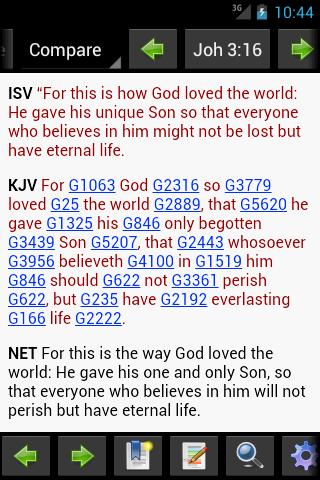
Finally I just dug in until I found an app with a screen shot that looked like exactly what I wanted. I installed it, and it works like a charm... not only does it have Strong's definitions, but it also has Thayer's definitions, which are broader in scope than the brief Strong's definitions. The app is called MySword Bible, and the screen shot you see at right shows the KJV translation with the Strong's links inline. It does exactly what I had hoped all those other apps would do, so I use it only for that... I never switch from the KJV+Strong's translation. It's very easy to find a verse (some of the apps listed above are surprisingly hard or slow to navigate, particularly Logos), and if I want to read Strong's/Thayer's definitions, I just click on the Strong's number.
But I didn't get rid of the other apps, no sir! I have MySword installed, but I also have YouVersion, Logos Bible, and Faithlife Study Bible installed. Some church services I'll actually run all of them concurrently, with different translations open in each! That way I can switch between five or six translations very quickly and never lose my place in any of them. (The danger is that you can get so distracted by driving your phone that you forget to listen to the minister... but I digress.) It's incredible the sheer volume of information about the Bible that is accessible from my little $200 cell phone. Sitting in church, I have in my hands the equivalent of a whole bookshelf full of Bible translations and study works. It's funny, though, that it took me over a year to find an app with the one single feature I was looking for!
Don't get me wrong... there are a BAZILLION Bible apps out there. The #1 app I would recommend to any Android user is the YouVersion app (actually, for pretty much any platform YouVersion has an app, and they are all terrific!) If you don't have a Bible app on your phone, just get YouVersion. Just click over and download it. Now. It's totally a no-brainer. I love YouVersion, but it doesn't really have one of the things I wanted: to be able to look up original-language definitions for individual words. Basically, I wanted to be able to click on something and see the Strong's Concordance definition. YouVersion is focuses on getting people to read devotionally, not really on drilling deeper with Word Studies and such... not a criticism, just an observation. I still have YouVersion on my phone. I still use it quite often. And I still highly recommend it; it's one of the first things I install on any new phone. But it didn't have the one function I wanted.
So I looked further. I have invested some time and money into modules for my Logos desktop software, so I decided to try out their app, figuring that since Logos is designed for serious study, it would probably have by dream feature. The Logos Bible app does link up to most of the modules I've purchased for my desktop version (though not all of them), and it does have some pretty nice study features for a mobile app. It also has a split-screen function so you can view two books (two different translations, a Bible and Study Bible Notes, a Bible and a Bible Dictionary, etc.) and I use that constantly. And it has some Greek/Hebrew language functions, but strangely enough, trying to click an English word and find out what the original-language word means is a little bit hit or miss. I still have it installed, and I use it quite frequently in church, but it didn't have that one key thing I wanted: click the word, read the definition. (By the way, there are some free Logos modules, but you'll get access to a lot more translations for free with YouVersion than with Logos.)
There are mobile versions of a lot of the Bible Web sites out there, too, and quite good ones: Bible Gateway, My Study Bible, and even YouVersion have standout mobile sites, and I bookmarked all of them. The problem with those is that the cell data reception inside my church is pretty awful, and at the time they didn't have WiFi for use by the congregation, so using those in church wasn't going to happen. It needed to be an app with offline versions, like YouVersion or Logos.
So I started trying out apps that were being developed by some of the other Bible Web sites I was familiar with. Bible Gateway released an app which is pretty good. Bible.is has an app which incorporates video clips from "The Jesus Film," which is sort of an unusual feature. eBible.com took an interesting tack with their app: you actually speak the Bible reference you want to look up, and it reads it back to you audibly! I tried all of those, and even installed the plain-vanilla ESV only app, mainly just because I'm a big ESV fan and wanted to take a look at it. They all had good points and bad points, but none of them had what I wanted: direct links from the Bible text to Strong's numbers.
A very recent entry into the fray deserves a mention: the Faithlife Study Bible. This app is actually a whole self-contained Study Bible with several available translations and with study notes that are actually tweaked specifically to match whatever translation you are reading. The notes will actually grow and evolve over time, as readers email in questions and new articles are added. It's a really cool deal, and I like it a lot... but it uses the Logos engine, so still no direct-to-definitions functionality.
But I didn't get rid of the other apps, no sir! I have MySword installed, but I also have YouVersion, Logos Bible, and Faithlife Study Bible installed. Some church services I'll actually run all of them concurrently, with different translations open in each! That way I can switch between five or six translations very quickly and never lose my place in any of them. (The danger is that you can get so distracted by driving your phone that you forget to listen to the minister... but I digress.) It's incredible the sheer volume of information about the Bible that is accessible from my little $200 cell phone. Sitting in church, I have in my hands the equivalent of a whole bookshelf full of Bible translations and study works. It's funny, though, that it took me over a year to find an app with the one single feature I was looking for!
Labels:
mobile,
noapp,
software,
Study Bibles,
YouVersion
Saturday, April 14, 2012
YouVersion - you should have it on your phone
A few days ago I did something I haven't done often. I wrote a "User Review" of an app on the Android Market:
YouVersion's Bible app really is the cream of the crop for mobile device Bible reading. Well, I'll temper that statement a little bit: the YouVersion app is free, and there may be paid apps out there that rival it in one way or another. In fact, since I use the Logos software on my home computer, I also have the Logos Android app installed, and it gives me a bunch of study materials that YouVersion doesn't have (the ESV Study Bible notes, for example), and on top of that it lets me split my screen in half and view two translations at once! But I use YouVersion far more often, and here's why:
This is the Cadillac of Bible apps. It's designed simply to get you reading the Bible; it has very little in the way of study tools such as cross-references or Greek/Hebrew lexicons. What it does have is just about every Bible translation that the layman has ever heard of, even in audio in some cases, and scads of "reading plans" to help you get engaged with the translation of your choice. It eliminates any excuse you might have for not reading the Bible regularly. The icing on the cake is that it's free!The app I was talking about is of course YouVersion, which I have mentioned here in the blog several times before. If you have it on your phone, it's probably just called "Bible". If you don't have it on your phone, right away you should visit http://youversion.com/download with your phone and download it! Here's a QR code you can scan to take you there if that's the way you roll:
YouVersion's Bible app really is the cream of the crop for mobile device Bible reading. Well, I'll temper that statement a little bit: the YouVersion app is free, and there may be paid apps out there that rival it in one way or another. In fact, since I use the Logos software on my home computer, I also have the Logos Android app installed, and it gives me a bunch of study materials that YouVersion doesn't have (the ESV Study Bible notes, for example), and on top of that it lets me split my screen in half and view two translations at once! But I use YouVersion far more often, and here's why:
- YouVersion has probably every Bible translation you've ever heard of. It certainly has my favorites... the ESV, NAS, HCSB, NIV, NLT. There are scads of English versions, and a bunch of non-English translations as well.
- It's easy to use. You open it up, tap the icon that says "Bible", and you're reading the Bible! Changing the passage you're looking at or changing the translation you're reading are intuitive processes (which is something I can NOT say about the Logos app... changing translations or passages in that app is pretty convoluted until you get used to it).
- Audio. Not a recreational reader? Staring at a page of text makes your eyes roll back in your head? The YouVersion app has audio files for many of their translations, which means that after you point and click your way to a passage, you can listen to it instead of (or in addition to) reading it. This means that you could listen to the Bible in your car on a daily commute (I've done it), while you're going to sleep at night (done that too), or wherever you are.
- Reading plans. YouVersion has tons of daily reading plans that you can choose from. Some of them are only a couple of days or a week long and cover specific topics or books; others range up to long-term plans to read through the entire Bible. And you can use the audio in conjunction with your reading plan, so instead of reading passages from sometimes several different books/locations, you can have them read to you. I'm working on a reading plan that has a two chapters assigned each day from two different books. If I start the audio running on the first chapter, when it reaches the end it proceeds to the second chapter automatically! How cool is THAT? If you sign up for a free YouVersion account, you can track your reading over time, and you can actually read through an app or their Web version and you "get credit" from whichever you use (so you could read from your phone one day, listen to audio on your phone the next day, and read on your computer the next day, and the system tracks your progress from all three). It can also be set up to fire an alert on your phone every day to remind you to read your passage, and if you miss a day or two you can shift your reading program's dates so that today's reading is the only one you have to complete to be caught up. No guilt trip and no scrambling to catch up by reading multiple days... nice! It's the least stressful Bible reading plan system I've ever tried.
- Downloadable translations. Some, but not all, of the Bible translations in YouVersion can be downloaded to your mobile device so that you can access them even from places where you do not have data access; other translations (because of restrictions set by the publishers) are not downloadable.
Sunday, October 30, 2011
YouVersion - download NIV and NLT online for free!
NIV and NLT Available for Download: 48 Hours Only!Get 'em while you've got the chance! Hey, can you believe that YouVersion's app for Java phones is still in active development. How many mobile apps can say that?
Some of you have let us know that you lost your offline Bible versions after upgrading or replacing your phone without having offline translations backed up. Most versions in the Bible App are available to download anytime. However, a few are not, so we reached out to our friends at Biblica, Zondervan, and Tyndale, and they have graciously allowed us to offer the New International Version (NIV) and the New Living Translation (NLT) for a limited time.
For just 48 hours next weekend—from 12:00 AM October 30 through 11:59 PM Central Time U.S. (GMT -5) October 31—you’ll once again be able to download the NIV and the NLT for offline use. (When you download a version, that means you can read it in the Bible App even when you’re offline—that is, when you can’t connect to your service provider or to the Internet.) Special thanks go to Biblica and Zondervan for making the NIV available, and to Tyndale for the NLT.
Labels:
Bible,
mobile,
noapp,
software,
YouVersion
Monday, March 7, 2011
Lamp
So, not too long ago I inherited a cell phone. My wife wanted a snazzy new Android phone, and I wanted to get her one, and I found a company with a nice phone on sale and a dynamite no-contract deal. So she got the new phone, and I inherited her old one; I've never carried a cell phone before, but we were under contract anyway so I decided to just take over her old phone until the contract runs out.
So this old phone isn't an Android, and it isn't an iPhone. It isn't a Blackberry or Windows Mobile. This is what they call a "messaging phone," and it can run apps, but they have to be written in the Java language. Java apps are generally pretty simple, and I loaded up some that work and some that didn't, but I really wanted a Bible app, just so I'd have it. YouVersion has a Java app, but because this particular phone is pretty restrictive as far as what you can do and the YouVersion app requires data access to work (plus, I don't have a data plan) I wanted something self-contained.
What I found works quite nicely! The app is called "Go Bible" (not to be confused with this device called GoBible). You can see a picture of it on the right. It has the entire KJV Bible in it, and the whole thing fits on the phone with no need for data access. It's searchable, and it's quite easy to figure out and use. If you have a very simple phone that can only run Java .jar apps, I highly recommend it! (If I had known about it when I wrote this post, I certainly would have mentioned it!)
One thing I found out very quickly when I started carrying this phone was something everyone seems to discover right away: a cell phone is almost without fail going to be used as a flashlight sooner or later. One problem for me was that I'm using a sort of dark wallpaper (this one... Buzz FTW!) so I have to pull up the contact list or something with a white background if I want maximum light from the phone. Problem is, some of the screens on the phone time out and the screen dims and then turns off to save power, which means I have to keep pushing a button to get my "flashlight" to come back on. I downloaded a couple of "flashlight" apps, but they don't really have anything to recommend them, and the ones I tried are kind of messy software anyway. But I did find out that when Go Bible is running, the screen never shuts off. Hello, KJV flashlight app!
So this old phone isn't an Android, and it isn't an iPhone. It isn't a Blackberry or Windows Mobile. This is what they call a "messaging phone," and it can run apps, but they have to be written in the Java language. Java apps are generally pretty simple, and I loaded up some that work and some that didn't, but I really wanted a Bible app, just so I'd have it. YouVersion has a Java app, but because this particular phone is pretty restrictive as far as what you can do and the YouVersion app requires data access to work (plus, I don't have a data plan) I wanted something self-contained.
What I found works quite nicely! The app is called "Go Bible" (not to be confused with this device called GoBible). You can see a picture of it on the right. It has the entire KJV Bible in it, and the whole thing fits on the phone with no need for data access. It's searchable, and it's quite easy to figure out and use. If you have a very simple phone that can only run Java .jar apps, I highly recommend it! (If I had known about it when I wrote this post, I certainly would have mentioned it!)
One thing I found out very quickly when I started carrying this phone was something everyone seems to discover right away: a cell phone is almost without fail going to be used as a flashlight sooner or later. One problem for me was that I'm using a sort of dark wallpaper (this one... Buzz FTW!) so I have to pull up the contact list or something with a white background if I want maximum light from the phone. Problem is, some of the screens on the phone time out and the screen dims and then turns off to save power, which means I have to keep pushing a button to get my "flashlight" to come back on. I downloaded a couple of "flashlight" apps, but they don't really have anything to recommend them, and the ones I tried are kind of messy software anyway. But I did find out that when Go Bible is running, the screen never shuts off. Hello, KJV flashlight app!
Your word is a lamp to my feet
and a light to my path.
(Psalm 119:105 ESV)
Labels:
electronics,
humor,
KJV,
light,
Psalms,
software,
YouVersion
Wednesday, February 9, 2011
Softer Bibles ...Bible series, part 5 of 6
Fast forward a couple of years. I was at some event, a Christian rock concert or something, and I picked up a demo disk of some software called "Gospel Godspeed." The disk had, I believe, just the four Gospels and not the whole Bible on it, but it was on a single floppy, and the search was lightning fast. The materials that came with the software indicated that the reason for the speed of the search and for the amount of data that would fit on the single floppy was a proprietary compression/indexing method that had been created by the developer. I thought it was incredible! I never ran across the full version, but to my surprise, it appears to still be available. Who would've thought that a piece of Bible software could last 20+ years? If you're under the age of about twenty, click the "Screens of GodSpeed in use and animated demo" link on that page and get a taste of what MS-DOS applications looked like, back before you were born!
The first serious piece of Bible software I ever owned was called QuickVerse. It arrived on the newer 3½" diskettes (a WHOLE BUNCH of them!), and you could buy multiple translations to add in. By this time hard drives were commonplace, which meant that not only could you have the whole Bible available at once, but you could have multiple translations open at once. One of my favorite things to do with QuickVerse was to divide the screen into four quadrants and open a different translation in each one, and link the four parts of the screen so that when you went to another verse or passage in one window, the other windows would change accordingly. Instant parallel Bible!
This may sound commonplace today, but when I first bought QuickVerse, it was an MS-DOS application, and this seemed positively amazing. You could also unlink the quadrants and display different passages, or open a notes screen in one and take notes, including links to other verses. (I spent some time trying to create a notes file which linked parallel passages from different parts of the Bible; I completed the links between identical events in the Gospels, and did some work in the Old Testament, but I never really completed it. The project died a premature death when the disk file got corrupted somehow, but I learned a lot doing it!)
QuickVerse was good software. I used it for a long time, and even purchased the NIV translation and several other add-ons (I honestly don't remember how many translations were available or how many I had, but I do remember there were several to choose from.) I spent many hours looking up Strong's definitions, doing word studies, and generally having a great time with QuickVerse. Later on a book format called STEP was developed, and Bible-related books in STEP format are still there to be found out on the Internet. I stuck with QuickVerse into the era of CD-ROMs; I still have my CDs of an old version. QuickVerse is still going strong today, with multiple editions available. I haven't used the latest incarnations, but it served me well for many years.
The next Bible software that I came across was much cheaper than QuickVerse. It was free! e-Sword is world-class Bible software at below-the-bargain-basement pricing. Rick Meyers, the software's author (and, incidentally, father of Christian Rock artist Krystal Meyers), gives it away for free for no other reason than that he wants to share the Word with others. e-Sword is amazing software; I've recommended it to many people. There are 20+ translations available for free, and 15+ more available for purchase at a nominal fee; you can view and search Hebrew and Greek definitions, Bible (and otherwise) dictionaries, commentaries, and your own user-generated notes. There are even devotionals and maps to download! The software is easy to use, and if you don't have Bible software and aren't ready to invest in a retail package, give e-Sword a download. It might be everything you need and more that you ever dreamed of, or it might even whet your appetite for something more! e-Sword provides the basics of Bible study software. It's not fancy, but it works well and as advertised.
The first couple of copies of the ESV Bible that I bought had postcards in them for a free Bible software package. This software was called Libronix, and was related to a Bible package I had heard of but never tried called Logos. Libronix/Logos provides some pretty amazing tools; you can search for words or topics, or you can generate instant word studies and exegetical guides, or you can pull up several pages of information related to whatever passage you are studying. Within seconds you can literally generate as much information as would have taken a Bible School student a whole day to find 20 years ago. The quality and quantity of information is astounding. A far cry from spending 45 minutes swapping floppy disks to find all the times the King James Version uses the word "love"! The postcards still come free with some new ESV Bible purchases (although I didn't get one when I bought my ESV Study Bible), and the software CD itself comes with some other Bible purchases (The NKJV Study Bible, for example). There are other inexpensive entry-level packages that feature Libronix (like the Essential Bible Study Library, pictured at left); the Logos software packages are fairly high-end and expensive, but that's because they are positively packed with resources. It's great software to check out!
Almost a year and a half ago, I heard about some new Bible software coming out called, simply, "Glo." I looked into the software, and became so interested that I actually blogged about it before it was even released! Since then I have had a chance to try out the software, and it is genuinely revolutionary. That old post has some demo videos embedded that will truly knock your socks off, and the actual experience is just as exciting (and, dare I say it, FUN!) as the videos would lead you to expect. Since its release it has seen frequent updates, which is always nice to see (look back at the Godspeed part of this post for an example of what happens when Bible software is left alone without being updated!) It's even being ported to the Mac and to tablet devices like the iPad. If I had a computer capable of running it, Glo would be the main Bible software on my desktop... unfortunately, it requires a dual-core processor to run smoothly, and my home machine doesn't have that kind of horsepower (it's an older model; if you've bought yours in the past few years, it probably can handle it). I have a copy of it sitting on my bookshelf collecting dust until I get a new computer!
While I was writing this blog post, I installed e-Sword to refresh my memory of what it's like, but besides that I don't actually have any Bible software installed. Why is that? Because online Bible software has just become so darn awesome! Here are a few of my favorite online Bible sites:
BibleGateway.com - this is my go-to Bible site, particularly for viewing multiple translations (I mentioned it in my post about Bible translations last week, in fact). With 25+ translations in English, it's very easy to use for translation comparisons. It's also very link-friendly, so if you want to tweet a Scripture verse or passage, or email a friend a link, or post on Facebook... Bible Gateway is very easy to use. They are currently beta-testing the new version of their site; find that beta version here.
Blue Letter Bible - this oddly-named site is also oddly-designed, but once you get used to the weird "K-C-L-I-V-D" buttons, you will discover some fairly deep information. I use it all the time for Greek/Hebrew tools... it's my favorite place online for drilling down to the Strong's definition, and then spreading back out to find all of the places where that word is used in the original texts.
BibleStudyTools.com - another great multi-translation site. I used to use this one from time to time, but I find most of what I need on Bible Gateway or Blue Letter Bible, so it's not high in my bookmark priority list. But it's absolutely a great site to try out.
The makers of Logos and e-Sword actually have their own online Bible sites. Take a look at Bible.Logos.com or e-Sword LIVE to see what they've got!
Several years ago, the publishers of the ESV Bible began to make the full contents of their study Bibles available online. The first one I remember being that way was the ESV Literary Study Bible; there was a limited preview period, then you could pay a small fee to have your access continue indefinitely (their shopping cart has been broken for some time, so presumably the online access purchase option wasn't terribly popular). The Literary Study Bible doesn't particularly have a lot of study notes; it's primarily oriented toward book and section introductions, and lets the text mostly speak for itself. Because it's more about reading straight through than pinpointing a particular verse, I don't find digital access very useful (I own a paper copy), but you might. It's free to try out, anyway.
The next online study Bible I heard of was the ESV Study Bible. It was published simultaneously in bookstores and online, and if you bought a physical copy you also got a code you could use to access the online copy, which contains all of the same materials that are in the one on your bookshelf. The original site has been upgraded and now the ESV Study Bible Online lives at ESVonline.org. (I actually wish they would roll the Literary Study Bible site into this one too; it might give new life to that LSB material to have it on an upgraded platform.)
About four months ago I was at my local Christian bookstore looking for a demo copy of the HCSB Study Bible when I saw a sticker on one of them that said something along the lines of "Visit MyStudyBible.com!" I wrote the site name down and looked it up when I got home, and to my surprise, the site contains, and will always contain absolutely free, all of the material from the HCSB Study Bible! ESVonline.org and MyStudyBible.com have a lot in common, and they're both terrific study Bibles, so I would highly recommend both sites. I blogged about MyStudyBible.com here.
But what about when you're not at your computer? Well, there are tons of Bible apps out there for your cell phone, and there are online sites that have mobile versions, but I'll just mention the app that I consider the cream of the crop: YouVersion.
Their mobile offerings include apps for iPhone and iPad, Blackberry, Android, Palm, and even Java and Symbian. Any translation that is available on their Web site is also available over the air via the apps, and some of the translations are downloadable for offline use. And if your phone isn't up to apps, you can use m.YouVersion.com for a phone-formatted version of the Web site. YouVersion is completely free - it is a ministry of LifeChurch.tv church, and a lot of the work on the apps is actually done by volunteers. That doesn't mean that the apps are bad at all, but it does mean that depending on the availability of developers for the platform, some of the apps may have different feature sets than others. The church is deeply committed to YouVersion, and there are several full-time staff members there who are dedicated to it alone. Take a look at the YouVersion blog to see how excited they are about it!
Are digital Bibles making paper Bibles obsolete? Are online Bibles edging out Bible software? Is mobile the way of the future? Well, I'd say that computerized Bibles have made Bible study much quicker and easier, and mobile Bible offerings have made it much easier to read the Bible wherever you are, but I think there is still a place for physical Bibles, and for computer Bibles, and for mobile. To me, the mobile offerings are about convenience, while computer Bible study tools (online or installed software) are best for fast but still in-depth study, and physical Bibles are best just for the sheer joy of reading. I think each is a different experience, just like listening to the Bible on an audio CD is different from reading it yourself. But it's all the Word of God, and I think it's great to have many ways to access it! It's wonderful to live in a time in history when there are so many ways to hide the Word in your heart. Hide it today!
If you're interested in purchasing some Bible software, ChristianBook.com's Bible software store is a good place to start looking!
Thursday, October 15, 2009
Launching Today: Glo Bible (Bible study software)
A few days ago, I got an email from ChristianBook.com about Bible software. I usually don't pay very close attention to that email, because although I've used QuickVerse and Logos both fairly extensively at various times, and sampled other Bible software packages, I've found the free e-Sword to have everything from the commercial packages that I've ever needed. Generally, what I want is to be able to compare a fairly large number of English translations of the Bible easily. That means finding them quickly and then having the other translations at your fingertips. I like to have some commentaries available to me, too, as long as they cost me little or nothing. Photos of the Holy Land, videos, that sort of thing... even maps... generally have left me cold when they come from Bible software. But in that email, the simple, distinctive packaging of one of the boxes caught my eye enough to get me interested in taking a look.
The package that caught my eye was the new Glo Bible software, which comes out today. And the more I saw, the more interested I got! Now, I haven't held a copy of this software in my hands. I haven't used it. I haven't even seen it in action in person, only on the demo videos. It looks to be fairly resource-intensive, so it might even not work very well on the aging computers I have at home. But boy, if you can get it to do what it's doing in the videos... WOW!
I'll give you a brief introduction, kind of to help you get your bearings beforehand, and then you can take a look at their demo videos and see what you think for yourself. If you've used Bible software before, put that out of your mind for a second, becuase that's NOT the way this thing works. I don't even think there's a place that you can type in "John 3:16" and get the verse to come up... this is a different interface to the Scripture text. You access the Scriptures using what they call "lenses." The five lenses are "Bible", "Timeline", "Atlas", "Topical", and "Media". You could think of them as paths that all eventually lead to the same place... the Bible text ("Media" is a little different, because in addition to Bible text, it also leads to videos, pictures, immersive 3D tours of Bible locations, etc.) The "Bible" lens presents the Scriptures in the way we're used to seeing them... starting in Genesis and ending in Revelation, and all strung out in their whole 66-book canonical (Protestant) order. The "Timeline" lens comes at it from a different perspective: Bible events are laid out in a time line from beginning to end. Events in the life of Jesus are all there in their real-time order, for example, not segregated out by each of the four Gospels. The "Atlas" lens actually plots the Biblical events out on a map of the Holy Land, so if you wanted to see everything that ever happened in the Bible in Bethany, or in Jerusalem or wherever, you just have to check that place out on the map. The "Topical" view presents Scripture by topics... the same basic premise of ScriptureMenu.com but in a much flashier way. The "Media" lens is where you will find photos, videos, and those really cool 3D tours of sites related to the Scriptures you are studying. You can also combine lenses, so, for example, you could find everything that Jesus said in Jerusalem during the Passover in the book of John (which is the example from their demo videos). Interested? Here's the short & sweet video about it:
Looks cool, huh? If you have about fifteen minutes to spare, take a look at these two demos that demonstrate the usage in a little more depth:
I was totally WOWED after watching those demos! To my way of thinking, this is the first time since searchability (which I saw happening way back in the late 1980s) that Bible software has been created that can actually do something you can't do just as easily with a paper Bible. Because the features are based on "tags" placed on the Scripture verses by humans and not straight text searchability, the relationships between the verses feel a lot more organic.
However... this may be a shortcoming of the software as well. If the people who tagged the text have a different theological perspective than you do, you may not agree with the way they've arranged things. Are you pre-Trib, mid-Trib, post-Trib? Depending on which is your theory of choice, the books of Revelation, Daniel, and even Isaiah and other prophetic books may not show up the way you'd like to see them in the Timeline lens. What about that passage from Isaiah about the king of Babylon... is that about a man, or about Satan? Your answer may effect whether you agree with the Timeline view on the placement of the passage.
I also immediately noticed something in the demo of using multiple lenses together to narrow down your search. About five minutes into the "part 2" video above, there is a screen showing the location of all of the words of Jesus in the New Testament. There are passages in each of the Gospels, Acts, and Revelation... but what about this passage in 1 Corinthians? Looks like an unintentional omission to me. And the Topical view has potential to show Theological bias even more, especially in hot-button topics like abortion or eternal security. Don't get me wrong; every single study Bible and commentary has a bias, so this couldn't be an exception. But I don't see different editions of Glo based on your eschatology or whether you sprinkle or dip. I don't see a Catholic version and a Protestant version. Whatever is there, is there.
That may change, though. Based on information you can find at BibleGlo.com, a lot of new stuff is coming down the pike... a full-length audio version, for example, and Web accessible and mobile phone versions, not to mention social networking features. It sounds like some of these new features will basically be downloadable. I can't see why there couldn't be separate flavors, using the same Bible text and multimedia materials, but simply tagging the Scritpure verses slightly differently... and then Glo owners could sort of "subscribe" to the "channel" that they fall in line with, and their own copies of Glo could change to reflect their own biases toward the text. It appears that Glo will ship with the KJV and the NIV (it's a Zondervan product, and they own the NIV text) but there are negotiations taking place to add other versions... I probably wouldn't plunk down the money for myself until my ESV was represented. The very limited number of translations available at present is, to me, another very puzzling omission.
Oddly, I don't actually see in the demos a way to do a straight word search. Can you find all of the places that the word "soul" appears in the text? Maybe so, but I don't see it... you might have to visit BibleGateway.com for that one. What about links to original-language materials? Where are the Strong's definitions and other similar material? I guess you'd better not delete your link to Blue Letter Bible quite yet. Now, I should be totally fair... those capabilities may be present in the software but not in the demos. Or maybe they have been intentionally left out in favor of cool stuff like 360-degree walk-throughs of historical locations and other stuff that would interest a more casual reader in the Bible text. Obviously, this software is not targeted at your basic seminary professor or knowledgeable pastor... this is layman's software for people who want to know what God says about something but don't know how to find out. But I do hope there is a doorway there that people can walk through and get into more depth with the Scriptures.
And that is my biggest concern with this awesome piece of software. Let's say you buy Glo, install it on your laptop, and then spend the next three weeks figuring out how everything works. You become a Glo expert, and you can find out which Scripture verses refer to insects with six legs, or which verses are about women whose names start with the letter "A", or whatever other crazy lookups you can think of. You continue to use the software every day, and you continue to find nuggets in the Word, but you never actually read all the way through any book of the Bible. In fact, you rarely read three verses in a row all at once. You use the lenses to severely limit which verses you read, based on what you tell it you want to know about. In that scenario, not only have you given yourself a bad case of Scriptural tunnel vision and destined yourself to begin to share the bias of whoever tagged the verses, but you are robbing yourself of the insight you can gain from context. You've turned yourself into someone who gets his Theology from the "promise box" on the kitchen table, or the snatches of Scripture that you hear in songs on Christian radio. I think the danger is that we can turn ourselves into fans of the Bible instead of students of the Bible. The Word is not a Whitman's Sampler where you can eat the ones with the caramel in them but leave the ones filled with pink stuff for your Aunt Gertie. The Bible is an all-or-nothing proposition. In an age where it is easy to zero in on specific verses, and where many preachers skip from one verse to another in the course of a message with no reference to context, we're not used to just plain old reading the Bible like the book it is. Now, Glo has a Bible reading plan built in (and it sounds like the plan is to have the mobile version and even the audio version sync up so that if you read a chapter at home and then listen to the next chapter in the car, eventually all of that information winds up back in Glo!) and there is absolutely nothing to stop you from reading it straight through (the Bible lens would actually be pretty great for that), so the "danger" isn't really a danger, but a caution to not let the very cool features of the software package deceive you into thinking you know all about what the Bible says just because you clicked into the Topical lens. To truly know the Word takes effort. Hard work. A great shovel is only the first step in digging up the riches present in the Bible. Software that can bring some of them a little closer to the surface for you is a great start, but it's not the whole journey.
Even the coolest, shiniest, round-buttoniest software won't turn you into something you're not. If you're not a student of the Word, this software (or any software) will not change that, although given the right circumstances, a snazzy interface may get you to engage the text in a way you wouldn't have been otherwise. When it all comes down to it, either you're hungry for the Word, or you're not. This software probably won't make you hungry. But if you are hungry, this software could be like an express train from your house directly to Olive Garden. It'll get you to places you never thought to go, faster and easier than ever before, and in ways you never dreamed of (or maybe you did dream of but never thought it could actually happen).
I hope I actually get a chance to play with this sometime. Besides being an awesome tool, it just looks incredibly fun! I doubt it'll have me giving up my ESV Study Bible (my favorite Bible study resource of all time), but it could add a dynamism to my study times that wouldn't be there otherwise. I'll be watching Glo to see where it goes next. Glad to be here at lift-off!
The package that caught my eye was the new Glo Bible software, which comes out today. And the more I saw, the more interested I got! Now, I haven't held a copy of this software in my hands. I haven't used it. I haven't even seen it in action in person, only on the demo videos. It looks to be fairly resource-intensive, so it might even not work very well on the aging computers I have at home. But boy, if you can get it to do what it's doing in the videos... WOW!
I'll give you a brief introduction, kind of to help you get your bearings beforehand, and then you can take a look at their demo videos and see what you think for yourself. If you've used Bible software before, put that out of your mind for a second, becuase that's NOT the way this thing works. I don't even think there's a place that you can type in "John 3:16" and get the verse to come up... this is a different interface to the Scripture text. You access the Scriptures using what they call "lenses." The five lenses are "Bible", "Timeline", "Atlas", "Topical", and "Media". You could think of them as paths that all eventually lead to the same place... the Bible text ("Media" is a little different, because in addition to Bible text, it also leads to videos, pictures, immersive 3D tours of Bible locations, etc.) The "Bible" lens presents the Scriptures in the way we're used to seeing them... starting in Genesis and ending in Revelation, and all strung out in their whole 66-book canonical (Protestant) order. The "Timeline" lens comes at it from a different perspective: Bible events are laid out in a time line from beginning to end. Events in the life of Jesus are all there in their real-time order, for example, not segregated out by each of the four Gospels. The "Atlas" lens actually plots the Biblical events out on a map of the Holy Land, so if you wanted to see everything that ever happened in the Bible in Bethany, or in Jerusalem or wherever, you just have to check that place out on the map. The "Topical" view presents Scripture by topics... the same basic premise of ScriptureMenu.com but in a much flashier way. The "Media" lens is where you will find photos, videos, and those really cool 3D tours of sites related to the Scriptures you are studying. You can also combine lenses, so, for example, you could find everything that Jesus said in Jerusalem during the Passover in the book of John (which is the example from their demo videos). Interested? Here's the short & sweet video about it:
Looks cool, huh? If you have about fifteen minutes to spare, take a look at these two demos that demonstrate the usage in a little more depth:
I was totally WOWED after watching those demos! To my way of thinking, this is the first time since searchability (which I saw happening way back in the late 1980s) that Bible software has been created that can actually do something you can't do just as easily with a paper Bible. Because the features are based on "tags" placed on the Scripture verses by humans and not straight text searchability, the relationships between the verses feel a lot more organic.
However... this may be a shortcoming of the software as well. If the people who tagged the text have a different theological perspective than you do, you may not agree with the way they've arranged things. Are you pre-Trib, mid-Trib, post-Trib? Depending on which is your theory of choice, the books of Revelation, Daniel, and even Isaiah and other prophetic books may not show up the way you'd like to see them in the Timeline lens. What about that passage from Isaiah about the king of Babylon... is that about a man, or about Satan? Your answer may effect whether you agree with the Timeline view on the placement of the passage.
I also immediately noticed something in the demo of using multiple lenses together to narrow down your search. About five minutes into the "part 2" video above, there is a screen showing the location of all of the words of Jesus in the New Testament. There are passages in each of the Gospels, Acts, and Revelation... but what about this passage in 1 Corinthians? Looks like an unintentional omission to me. And the Topical view has potential to show Theological bias even more, especially in hot-button topics like abortion or eternal security. Don't get me wrong; every single study Bible and commentary has a bias, so this couldn't be an exception. But I don't see different editions of Glo based on your eschatology or whether you sprinkle or dip. I don't see a Catholic version and a Protestant version. Whatever is there, is there.
That may change, though. Based on information you can find at BibleGlo.com, a lot of new stuff is coming down the pike... a full-length audio version, for example, and Web accessible and mobile phone versions, not to mention social networking features. It sounds like some of these new features will basically be downloadable. I can't see why there couldn't be separate flavors, using the same Bible text and multimedia materials, but simply tagging the Scritpure verses slightly differently... and then Glo owners could sort of "subscribe" to the "channel" that they fall in line with, and their own copies of Glo could change to reflect their own biases toward the text. It appears that Glo will ship with the KJV and the NIV (it's a Zondervan product, and they own the NIV text) but there are negotiations taking place to add other versions... I probably wouldn't plunk down the money for myself until my ESV was represented. The very limited number of translations available at present is, to me, another very puzzling omission.
Oddly, I don't actually see in the demos a way to do a straight word search. Can you find all of the places that the word "soul" appears in the text? Maybe so, but I don't see it... you might have to visit BibleGateway.com for that one. What about links to original-language materials? Where are the Strong's definitions and other similar material? I guess you'd better not delete your link to Blue Letter Bible quite yet. Now, I should be totally fair... those capabilities may be present in the software but not in the demos. Or maybe they have been intentionally left out in favor of cool stuff like 360-degree walk-throughs of historical locations and other stuff that would interest a more casual reader in the Bible text. Obviously, this software is not targeted at your basic seminary professor or knowledgeable pastor... this is layman's software for people who want to know what God says about something but don't know how to find out. But I do hope there is a doorway there that people can walk through and get into more depth with the Scriptures.
And that is my biggest concern with this awesome piece of software. Let's say you buy Glo, install it on your laptop, and then spend the next three weeks figuring out how everything works. You become a Glo expert, and you can find out which Scripture verses refer to insects with six legs, or which verses are about women whose names start with the letter "A", or whatever other crazy lookups you can think of. You continue to use the software every day, and you continue to find nuggets in the Word, but you never actually read all the way through any book of the Bible. In fact, you rarely read three verses in a row all at once. You use the lenses to severely limit which verses you read, based on what you tell it you want to know about. In that scenario, not only have you given yourself a bad case of Scriptural tunnel vision and destined yourself to begin to share the bias of whoever tagged the verses, but you are robbing yourself of the insight you can gain from context. You've turned yourself into someone who gets his Theology from the "promise box" on the kitchen table, or the snatches of Scripture that you hear in songs on Christian radio. I think the danger is that we can turn ourselves into fans of the Bible instead of students of the Bible. The Word is not a Whitman's Sampler where you can eat the ones with the caramel in them but leave the ones filled with pink stuff for your Aunt Gertie. The Bible is an all-or-nothing proposition. In an age where it is easy to zero in on specific verses, and where many preachers skip from one verse to another in the course of a message with no reference to context, we're not used to just plain old reading the Bible like the book it is. Now, Glo has a Bible reading plan built in (and it sounds like the plan is to have the mobile version and even the audio version sync up so that if you read a chapter at home and then listen to the next chapter in the car, eventually all of that information winds up back in Glo!) and there is absolutely nothing to stop you from reading it straight through (the Bible lens would actually be pretty great for that), so the "danger" isn't really a danger, but a caution to not let the very cool features of the software package deceive you into thinking you know all about what the Bible says just because you clicked into the Topical lens. To truly know the Word takes effort. Hard work. A great shovel is only the first step in digging up the riches present in the Bible. Software that can bring some of them a little closer to the surface for you is a great start, but it's not the whole journey.
Even the coolest, shiniest, round-buttoniest software won't turn you into something you're not. If you're not a student of the Word, this software (or any software) will not change that, although given the right circumstances, a snazzy interface may get you to engage the text in a way you wouldn't have been otherwise. When it all comes down to it, either you're hungry for the Word, or you're not. This software probably won't make you hungry. But if you are hungry, this software could be like an express train from your house directly to Olive Garden. It'll get you to places you never thought to go, faster and easier than ever before, and in ways you never dreamed of (or maybe you did dream of but never thought it could actually happen).
I hope I actually get a chance to play with this sometime. Besides being an awesome tool, it just looks incredibly fun! I doubt it'll have me giving up my ESV Study Bible (my favorite Bible study resource of all time), but it could add a dynamism to my study times that wouldn't be there otherwise. I'll be watching Glo to see where it goes next. Glad to be here at lift-off!
Subscribe to:
Posts (Atom)