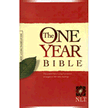
So that's what I'm doing. I selected the plan based on The One Year Bible; it seemed straightforward enough. It's linked to the NLT version, which is generally not my preferred translation but it's easy to get through. And that's my goal for this year: get through all of the parts of the whole Bible. Read the whole thing. In my previous try I was hoping to get a pretty deep understanding of how the Bible fits together - I did get that understanding, to an extent, and the parts that I made it through should feel a bit like old friends now. This time I just want to experience the Bible on its own, without trying to hard to learn every detail. Some things about history and context I should remember; other things I certainly will not. But I have a lifetime to go back over that stuff. This year I just want to make it all the way through. And with the help of some 21st-century technology (the Internet and a smartphone) I think I can make it happen!
Showing posts with label cell phones. Show all posts
Thursday, January 2, 2014
In A Year, Take 2
Three years ago about this time, I posted this. "This year I'm going to do it," I said - read all the way through the Bible. I wanted to go all the way through my ESV Study Bible (see what it looks like at ChristianBook.com) and read the whole text and the study notes. Not to far into my quest, I also decided to read the notes from my NIV Study Bible (here it is at CBD) and get a second perspective on things. The plan was good, the materials were just what I wanted, and I made some great progress. In fact, I made it more than halfway through the Bible that year (read my end-of-year wrap-up here), and in the long run I made it clear into the Minor Prophets before I completely fizzled out. We moved out of our house into a smaller apartment, the spot where I could read wasn't as conducive to peace and quiet, and whatever other reasons there might be took the wind completely out of my sails. At this point, if I picked that program back up where I left off, I would be totally in the dark about what I was doing.
So this year I decided to start over. This time, instead of doing it the "Give yourself a self-taught college-level Bible survey class" way, I decided to go with the "Get in, get it done, and get out Bible ninja" method. I still don't have a satisfactory Bible Study spot, but I think I can carve out a few minutes at bedtime every night. And I have a smartphone. It's got Bible apps. Bible apps have reading plans. In fact, I've used a couple of the shorter YouVersion reading plans before... why not jump in with one of the long-term plans?
So that's what I'm doing. I selected the plan based on The One Year Bible; it seemed straightforward enough. It's linked to the NLT version, which is generally not my preferred translation but it's easy to get through. And that's my goal for this year: get through all of the parts of the whole Bible. Read the whole thing. In my previous try I was hoping to get a pretty deep understanding of how the Bible fits together - I did get that understanding, to an extent, and the parts that I made it through should feel a bit like old friends now. This time I just want to experience the Bible on its own, without trying to hard to learn every detail. Some things about history and context I should remember; other things I certainly will not. But I have a lifetime to go back over that stuff. This year I just want to make it all the way through. And with the help of some 21st-century technology (the Internet and a smartphone) I think I can make it happen!
Labels:
Bible in a year,
cell phones,
ESV Study Bible,
NLT,
noapp,
software,
YouVersion
Wednesday, December 28, 2011
Scripture Menu on your Home Screen
Hopefully if you've been reading this blog for any amount of time, you know that it's actually part of a Web site called ScriptureMenu.com, and that we've actually provided a mobile version of the site to make it easier to access using your cell phone. Here's something you might not know: although we haven't technically built a formal "app" to install on your phone, it is very possible to put a link to the mobile site on your iPhone or Android phone's home screen, and that link will look like an app and behave like an app. When you touch it, you will be opening a browser to the mobile site. Scripture lists at your fingertips! Here are instructions on how to do it (thanks in large part to this post on Phil Wilson's blog; I'm copying the instructions from there to here not to steal Phil's content, but so the instructions will still be here if for some reason one day his blog is not):
iPhone
Either way, the result is that you've created a link that feels like a Scripture Menu "app" on your phone, but you haven't had to purchase, download or install a thing. The only thing you need is a data connection, and you've got instant access to the Scripture Menu wherever you are!
iPhone
- Open http://m.scripturemenu.com/ in Safari
- Click the icon at the bottom center of the browser. It may look like a square with an arrow in it, or it may simply look like a plus sign.
- Select "Add to Home Screen."
- If necessary, give your link a name (I recommend "Scripture Menu").
- Open http://m.scripturemenu.com/ in the Android browser.
- Bookmark the page.
- Open the browser bookmarks screen.
- Long-press the bookmark you just created.
- Select "Add to Home Screen."
Either way, the result is that you've created a link that feels like a Scripture Menu "app" on your phone, but you haven't had to purchase, download or install a thing. The only thing you need is a data connection, and you've got instant access to the Scripture Menu wherever you are!
Labels:
cell phones,
mobile,
noapp,
ScriptureMenu.com
Friday, March 25, 2011
ScriptureMenu.com Mobile Site Launches
Today I've launched a mobile version of ScriptureMenu.com! Just point your cell phone at http://ScriptureMenu.com and you should see the mobile version of the site. It contains the same information as the desktop version, but it is set up for convenient use via smartphones and most other Web-capable mobile phones. Let me know if you have any trouble with it, or if you have any suggestions!
(The direct link, if you prefer to bookmark it that way, is http://m.ScriptureMenu.com)
Labels:
cell phones,
mobile,
ScriptureMenu.com,
web sites
Subscribe to:
Posts (Atom)